it all about me......

Blog Archive

Showing posts with label IT Tips. Show all posts

HBase Master always Stop...


Use Case
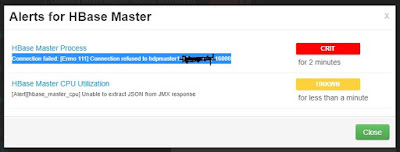
HBase Master Process always ERROR and stop the services after several minutes and need to start manually.

Solution
NTP Server not sync... So need to check NTP at where HBase Master and RegionalServer has been installed. So i found one of server that installed Regional Server has been stop.
[root@hdpworker1 ~]# ntpstat
synchronised to NTP server (103.16.182.23) at stratum 5
   time correct to within 262 ms
   polling server every 1024 s 
[root@hdpworker2 ~]# ntpstat
synchronised to NTP server (103.16.182.23) at stratum 5
   time correct to within 257 ms
   polling server every 1024 s 
[root@hdpworker3 ~]# ntpstat
timeout 
[root@hdpworker4 ~]# ntpstat
synchronised to NTP server (103.16.182.23) at stratum 5
   time correct to within 264 ms
   polling server every 1024 s
So need to start it again and restart all services for Hbase.
But it still failed after 30 minutes HBase Master has been started. 
So i procced to 2nd step... What the 2nd Step? 
Solve issue with stale WAL splits, by removing WAL's from hdfs location /apps/hbase/data/WALs/ and restart the HBase master and region services.

1. Make a temporary file other than /apps/hbase/data/WALs/  by this commands
su -hdfs 
hdfs dfs -mkdir /apps/hbase/data/tempWALs
2. Why i create temporary folder? Because easy if anything happen..  then move all file under /apps/hbase/data/WALs to this directory.
hdfs dfs -mkdir /apps/hbase/data/WALs/* /apps/hbase/data/tempWALs/
3. Then restart all services. Hopefully this will your right solution.
For me, this has solve my problem.

Refer :


Configuring NameNode Heap Size


Okay, so as my hadoop already reach more than 6 Milion files, the current setting is not suitable for running nameNode. So need toTotal Java Heap need to  increased to 6GB.

Details can refer this arcticle : https://docs.hortonworks.com/HDPDocuments/HDP2/HDP-2.6.5/bk_command-line-installation/content/configuring-namenode-heap-size.html

NameNode heap size depends on many factors, such as the number of files, the number of blocks, and the load on the system. The following table provides recommendations for NameNode heap size configuration. These settings should work for typical Hadoop clusters in which the number of blocks is very close to the number of files (generally, the average ratio of number of blocks per file in a system is 1.1 to 1.2).
Some clusters might require further tweaking of the following settings. Also, it is generally better to set the total Java heap to a higher value.
Table 1.11. Recommended NameNode Heap Size Settings
Number of Files, in Millions
Total Java Heap (Xmx and Xms)
Young Generation Size (-XX:NewSize -XX:MaxNewSize)
< 1 million files
1126m
128m
1-5 million files
3379m
512m
5-10
5913m
768m
10-20
10982m
1280m
20-30
16332m
2048m
30-40
21401m
2560m
40-50
26752m
3072m
50-70
36889m
4352m
70-100
52659m
6144m
100-125
65612m
7680m
125-150
78566m
8960m
150-200
104473m
8960m


[Note]Note
Hortonworks recommends a maximum of 300 million files on the NameNode.

You should also set -XX:PermSize to 128m and -XX:MaxPermSize to 256m.
Following are the recommended settings for HADOOP_NAMENODE_OPTS in the hadoop-env.sh file (replacing the ##### placeholder for -XX:NewSize, -XX:MaxNewSize, -Xms, and -Xmx with the recommended values from the table):
-server -XX:ParallelGCThreads=8 -XX:+UseConcMarkSweepGC -XX:ErrorFile=/var/log/hadoop/$USER/hs_err_pid%p.log -XX:NewSize=##### -XX:MaxNewSize=##### -Xms##### -Xmx##### -XX:PermSize=128m -XX:MaxPermSize=256m -Xloggc:/var/log/hadoop/$USER/gc.log-`date +'%Y%m%d%H%M'` -verbose:gc -XX:+PrintGCDetails -XX:+PrintGCTimeStamps -XX:+PrintGCDateStamps -Dhadoop.security.logger=INFO,DRFAS -Dhdfs.audit.logger=INFO,DRFAAUDIT ${HADOOP_NAMENODE_OPTS}
If the cluster uses a secondary NameNode, you should also set HADOOP_SECONDARYNAMENODE_OPTS to HADOOP_NAMENODE_OPTS in the hadoop-env.sh file:
HADOOP_SECONDARYNAMENODE_OPTS=$HADOOP_NAMENODE_OPTS
Another useful HADOOP_NAMENODE_OPTS setting is -XX:+HeapDumpOnOutOfMemoryError. This option specifies that a heap dump should be executed when an out-of-memory error occurs. You should also use -XX:HeapDumpPath to specify the location for the heap dump file:
-XX:+HeapDumpOnOutOfMemoryError -XX:HeapDumpPath=./etc/heapdump.hprof

Bagaimana hendak transfer file dari Linux ke Window?


Mungkin benda ini akan terjadi, yup memang terjadi pun. Hari ini ataicha nak share bagaimana cara hendak transfer file dari Linux ke Windows.

Biasa kita dengar PuTTY kan? Kita akan guna satu benda yang dinamakan pscp.

PSCP ni nama penuhnya PuTTY Secure Copy. Ia adalah satu aplikasi yang mampu membolehkan transfer files dari beberapa sistem operasi yang berlainan dengan menggunakan command window di sistem operasi Windows. Ianya adalah percuma.

Untuk menggunakan ini, digalakkan install PuTTY sekali laa ye..

Kalau belum ada, boleh install dari website ini (Klik sini)

Ok kalau dah install, jangan lupa letak kat mana ye.. biasa ataicha setkan install ke C:\Program Files\PuTTY


Ingat tau kat mana korang install... sebab nanti nak guna kena tahu kat mana korang install..

Step 1 : Buka Command Prompt korang.
Pergi ke Start Menu dan masukkan cmd.exe kat Search Field. Klik Enter.

Step 2 : ok tukar ke directory yang mana korang letak file tu.. cam ataicha set kat C:\Program Files\PuTTY so kena taip

cd c:\Program Files\PuTTY

ok dah kan?

so nak test jalan ke tak korang taip pscp plak..
pscp
 resultnya akan terpapar macam ini


Kalau keluar macam ini, pscp korang jalan ok laa tu..

Sebab isu privacy, so ataicha tak leh nak snapshot real situation laa ye..

ni example untuk rujukan

  • sample-dir-linux : /home/ataicha
  • sample-dir-windows : c:/ataicha/test
  • sample-linux-username : naufal
  • sample-linux-server-ipaddress : 10.20.30.40
katakan ataicha nak copy nama file ataicharesume.txt dari server linux ke labtop ataicha sekarang.

PERHATIAN : ops lupa pastikan server linux korang dah allow untuk ssh access tau. tak allowed memang tak jalan..

FORMAT UNTUK TRANSFER:
pscp.exe linux-username@linux-server-ipaddress: [source-DIR-inLinux] [destination-DIR-inWin]

kalau ikut example ataicha share kat atas tu.. korang kena taip cam ni
pscp.exe naufal@10.20.30.40:/home/ataicha/ataicharesume.txt c:/ataicha/test

dan nanti dia akan prompt untuk masukkan password linux ye..

maksud atas tu atas tu, ataicha copy files ataicharesume.txt yang berada di folder /home/ataicha di server linux ke c:/ataicha/test di windows.

PERHATIAN : pastikan folder wujud ye. sebab command ni tak leh nak create folder auto tau.

Semoga membantu anda semua.


Removing Line Breaks or New Line Characters in a SQL Query


So ni solution untuk remove atau replace line breaks or new line characters dalam SQL Query.
SQL Query : SELECT REPLACE( REPLACE (`FIELDNAME`, CHAR(13), '  '), CHAR(10), '  ') AS `remarks` from TABLENAME;
Yang mana REPLACE ni akan replace CHAR(13) dan CHAR(10) dengan ' '.

- For ataicha REFERENCE PURPOSE.

REFERENCES : http://blogs.catapultsystems.com/rhutton/archive/2013/10/03/removing-line-breaks-or-new-line-characters-in-a-sql-query/

[IT Tips] - Reset or recover forgotten Admin Password for Exinda


I have misplaced/forgotten my password to gain access to the Exinda device. Is there a way to recover a lost or forgotten password?

If the administrator of a system running firmware v5++ forgets the password of the user 'admin', the following method can be used to reset the password to the default password.

Default admin credentials are:
username: admin
password: exinda

The basic procedure is to boot the system to single user and execute a script to reset the 'admin' password in the active database. If any database corruption is suspected, the script resets the system database to an initialized default one. The 'admin' password is not set in such a database. A system booted to single user mode does not require a privileged user password.

First, the system must be rebooted or power cycled. It is assumed the person following this procedure is able to access the system's console and can see the entire boot process (this is either over a serial console or the system's direct console).


Step1: Press the down key when it says "Boot loading stage 2"and select the image to boot into. Once the image is selected (in this case 0) then press “e” to enter the edit command mode. This will give the user the ability to change the commands options that are part of the boot process.

     Boot Menu

---------------------------------------
0: exinda-5.4.0.13350 (i386) 2010/03/31
1: exinda-5.4.0.13350 (i386) 2010/03/31
2: memtest86+ v1.70
---------------------------------------

     Use the up and down keys to select which entry is highlighted.
     Press enter to boot the selected image. 'e' to edit the 
     commands before booting. 'a' to modify the kernel arguments
     before booting or 'c' for a command-line.
  Highlighted entry is 0:

Step2: Now use the arrow key and select 1 (for kernel.......) and type “e” again


     Boot Menu
---------------------------------------
0: root (hd0,1)
1: kernel /vmlinuz ro root=/dev/sda5    img_id=1 quiet loglevel=4 panic=10 console=tty0
console=ttyS0.9600n8
---------------------------------------

     Use the up and down keys to select which entry is highlighted.
     Press 'b' to boot, 'e' to edit the selected command in the 
     boot sequence, 'c' for a command-line. 'o' to open a new line
     after ('0' for before) the selected line. 'd' to remove the 
     selected line or escape to go back to the main menu.

  Highlighted entry is 1:


Step3: On the next screen after entering 'e' go to the end of the line and the text 'single' should be appended to the end of this line.

Note: The '<' indicates that a portion of the command line is not seen.  The arrow keys allow the user to navigate the command line to the very end so that above step 2 can be done as below:


Step4: On the next screen select option 1 (kernel.....) and type "b"  to resume booting the selected image.


    Boot Menu
---------------------------------------
0: root (hd0,1)
1: kernel /vmlinuz ro root=/dev/sda5    img_id=1 quiet loglevel=4 panic=10 console=tty0
console=ttyS0.9600n8 single
---------------------------------------

     Use the up and down keys to select which entry is highlighted.
     Press 'b' to boot, 'e' to edit the selected command in the 
     boot sequence, 'c' for a command-line. 'o' to open a new line
     after ('0' for before) the selected line. 'd' to remove the 
     selected line or escape to go back to the main menu.
  Highlighted entry is 1:


Step5: After more boot messages a 'root' user prompt should be displayed as below:

 resh-3.2#

Type here: “/sbin/resetpw.sh” as below:

resh-3.2#/sbin/resetpw.sh


Step6: If successful, the 'admin' password will now be reset to the default password. The system can now be restarted by issuing the command 'reboot' at the command prompt:

sh-3.2# reboot
 

[IT Tips] - Resetting a lost Fortigate Admin Password


If you have lost the admin password for a Fortigate you can reset it if you have physical access to the box.
  • Connect the console cable to the Fortigate and fire up your favorite terminal emulator
  • Reboot the firewall unit.
  • At the console login prompt, type in "maintainer" as the userid.
  • Type in bcpbFGTxxxxxxxxxxxxx as the password. xxxxxxxxxxxxx will be the S/N of the Fortigate. The serial number is case sensitive so for example you should use FGT60B, not FGT60b.
  • After logging in, change the admin password:
config system admin
edit admin
set password
next
end

Heads up: You have to type the userid and password within a few seconds of the login prompt first appearing. If you take too much time you should reboot the firewall again.

References : http://firewallguru.blogspot.com/2009/08/resetting-lost-fortigate-admin-password.html

Categories

haziq naufal (87) ataicha (41) Keisha Zara (26) Raja Petra Family (20) Jalan-Jalan-Ataicha (17) Mrs Ataicha (15) renungan (12) Hana Batrisya (11) mylife (11) Coretan Mengenai Anak-Anak (10) Che Rahim Family (9) Harian Metro (9) tazkirah (9) misi1hari1gambar (8) World Cup 2010 (7) salam takziah (7) zul imran papaju (7) Al Fatihah (6) IT Tips (6) Kosmo (6) Aniff Nur Atika (5) Happy Birthday (5) Lirik Lagu (5) contest (5) gshock (5) Big Data Team (4) Gossip Artis (4) Spain (4) hobby (4) kelantan (4) wasiyyah shoppe (4) 18SX (3) Baby Boys (3) GITN (3) Germany (3) Jalan-Jalan Cari Makan (3) Mahamahu (3) Masakan (3) Photo Album (3) Raja Faizah (3) Raja Fazida (3) Rujukan Ataicha (3) Taman Layang-Layang (3) Ulang Tahun Perkahwinan (3) Urusan kerja (3) ariff sufyan (3) artikel harian metro (3) batch 1997-1998 TI Kuantan (3) orang minyak (3) orang minyak laksamana (3) photographer (3) smt kuantan (3) Abang Man (2) Ahmad Tajuddin (2) Akmal-Hafiz (2) Ataicha Training (2) Award (2) Azam Azrin (2) Darnalis (2) GIveway (2) Hadif Zafran (2) Kuching (2) Laksamanapuri Condo (2) Malaysia (2) Man Utd (2) Mohd Suhaimi (2) Penang (2) Petua (2) Raduzita (2) Raja Aseri (2) Raya Aidilfitri 2014 (2) Related Bola (2) Selamat Hari Raya (2) Selamat Pengantin Baru (2) Sharp ESX115 (2) Teknik-1-Kuantan (2) Tutorial (2) Ucapan Tahniah (2) asyraff shukor (2) ataicha Reference (2) ataicha jr (2) baseball cap (2) caps collection (2) collection (2) covid19 (2) demam (2) diyrepair (2) fakta (2) gembeng (2) hairul safar (2) http://hatt4.wordpress.com (2) jamuan raya (2) keratan akhbar (2) makanan (2) misiturunberat (2) my little prince (2) ramadhan (2) rezeki (2) tip komputer (2) tournament bowling (2) training (2) #fooddelivery (1) 2012 Contest (1) 2012 Special Giveway (1) 4 ADIL (1) ASTRO (1) Agar-agar laici (1) Ajwad Nurajmal (1) Akram (1) Al-Quran (1) Alamanda-Putrajaya (1) Along-Anak-Tuan-Rumah (1) Alwey Sham (1) Ameen Husaini (1) Ampang Pecah (1) Ana-Ikan-Bakar-Petai (1) Anak Sepupu (1) Aneh Tapi Benar (1) Armada (1) Aroma Ikan Bakar Jeram (1) AyahDe (1) Azam Tahun Baru (1) BA-110JM-4 (1) BTP (1) Bangi (1) Bank Location (1) Bantuan Prihatin Nasional (1) Bayi Tersedak Susu (1) Belimbing Hutan (1) Biz lumayan (1) Boboiboy Galaxy (1) Boss-Babi (1) Brazil (1) Buat Duit (1) Bukit Tinggi (1) Cameron Highlands (1) Cara Nak Dapat Title "Datuk" (1) Carlo Ancelotti (1) Chelsea (1) Christiano Ronaldo (1) Coca-Cola (1) Contact (1) Cuti 1TM (1) DW6900-SB-9 (1) Data Warehouse (1) Edwin Van Der Sar (1) Ejen Ali The Movie (1) England (1) England vs Wales (1) Exinda (1) FREE (1) Facebook (1) Facebook Notification (1) Fadhilat Ramadhan (1) Felda (1) Final Sea Games 26th (1) Flip Text Generator (1) Fortigate (1) G-Shock (1) GAX100-MSA-4 (1) Gaji Menteri (1) Galaxy Tab 2 (1) Gambang Safari Park (1) Gambang Water Park (1) Gambar Lucu (1) Gembeng Reunion (1) Gombak (1) HBase Master (1) Hack (1) Hael Husaini (1) Hal Ehwal Islam (1) Hal Semasa (1) Hala tuju selepas SPM (1) Happy Deepavali (1) Hari Bapa (1) Hari Belia Negara 2012 (1) Hari Persahabatan Sedunia (1) Harta Pusaka (1) Hartanah (1) Have a tEa wiTh MiszLuLLaby (1) Hero Kartun (1) Hina Johor (1) Hotel Malaysia (1) IT Related (1) Indonesia (1) Indonesia vs.Malaysia (1) Info Kereta (1) Islam (1) Isu semasa (1) Janda Kena Tipu (1) Jantung (1) Jatuh Motor (1) Jenis Lelaki (1) Jokes (1) Jual Mercun (1) Juara Kelantan (1) Juara Master Chef Pertama (1) KLCC (1) Kak Long (1) Kamera Handphone (1) Karoot Komedia X (1) Kekasih lama (1) Kelakar (1) Kelantan Juara Piala Malaysia (1) Kemalangan (1) Kematian (1) Kempen 1 Blog 1 Bendera (1) Kenali Bayi (1) Klinik Panel (1) Legoland Malaysia (1) Lelaki (1) Lensa Buruk The Contest (1) MCMC (1) MH370 (1) MPP (1) Madihah (1) Mahadir (1) Mahattan Firstmarket (1) Main Futsal FREE (1) Majlis Sukaneka Hasanah Kids (1) Malaysia Boleh (1) Masalah Harta Pusaka (1) Masterchef Selebriti Malaysia (1) Mat Sabu (1) Mee Kari Nyonya (1) Megat Iskandar Shah (1) Menang Contest (1) Mia Nurqaisara Afrina (1) Mohd Lukman (1) NSK (1) Naib Johan (1) Naik HARGA (1) Nama Bayi Islam (1) Nama-nama Islam (1) Netherland (1) Nobody (1) Nor Azita Osman (1) Nur Is Cahaya (1) Nurul Gersang (1) OCBC Bank (1) P1 WinMax (1) PERKESO (1) Pantang (1) Pasar Malam (1) Paybox.me (1) Pemanggang Ajaib (1) Pemanggang Ikan Ajaib (1) Pengorbanan ibu (1) Penutupan Jalan (1) Perangsang Templer Golf Resort (1) Percutian Ataicha (1) Perempuan (1) Peristiwa (1) Phone (1) Piala Malaysia 2010 (1) Politik (1) Presint 18 (1) Promo TM (1) Promosi Terhad (1) Public Bank (1) Pukul Emak (1) Putrajaya (1) QR Code (1) Raja Muhammad Harith Haziq (1) Rambut Bayi (1) Rancangan HyppTV Percuma (1) Raya (1) Raya Haji (1) Recover Password (1) Remaja (1) Reset password Admin (1) Ringtones Samsung (1) Rodeo Steakhaus (1) Rooney (1) SK Blau (1) SK Hendrop (1) SK Pos Brooke (1) SK RPS Banun (1) SRK Clifford (1) Salbys Volcano (1) SeHAT (1) Season View (1) Seksyen 302 (1) Seksyen 307 (1) Selamat Hari Guru (1) Selayang (1) Serang Gereja (1) Servis Motor (1) Setia Hujung Nyawa (1) Seventeen (1) Simbah Menyimbah (1) Skim Rumah Pertamaku (1) Sogo SALE (1) Solar Audit (1) Sri Gombak (1) TM Rewards (1) Tadika Hasanah (1) Tahun Baru 2011 (1) Taska Haram (1) Tasmik (1) Tayar Kenderaan (1) The Karate Kid (2010) (1) Theory Matematik (1) Tip Petua (1) Tips Harmoni (1) UNIFI MOBILE (1) UPSR (1) UPSR 2012 (1) UiTM (1) Version Robot (1) Video Seks (1) Video Youtube (1) Waka Waka (1) Warih Ku Meran (1) YDP (1) ataicha SQL QUERY (1) azam photo (1) baby Girls (1) balik kampung (1) bangsar (1) bapa saudara (1) berat (1) berbuka puasa (1) berita (1) bertudung (1) blackberry (1) buang bayi (1) bulan ramadhan (1) cabaran copy menang (1) cara-cara tanam uri (1) cisco ccna (1) congrate (1) copy paste (1) creativity (1) darkcurse (1) dataontap (1) design (1) dugaan (1) duit tercicir (1) e-filling (1) gambar kelas (1) gnesop.com (1) gout (1) grafik (1) gshockfanclubmalaysia (1) gst (1) gym (1) hacker (1) hadapi dengan senyuman (1) handset (1) hantu raya (1) hargai nikmat (1) hibah (1) hypptv box (1) iCity Shah Alam (1) icha (1) iflix (1) intensedebate (1) jawatan kosong (1) jengka 17 (1) kain japanese cotton (1) katak (1) kejam (1) kenangan (1) kenapa aku.. (1) kerang (1) keretaku (1) kurus (1) layout baru (1) licin (1) linux (1) malware (1) masa (1) mmu (1) motivasi diri (1) myvi terbang (1) nasi daun pisang (1) nasi kerabu mahal (1) nik mohammad aryan (1) nikmat (1) novel best (1) pelajaran (1) pelancaran sistem e-tasarruf (1) pemanggang (1) penat (1) pendoman (1) penipuan di internet (1) petua ibu hamil (1) petua orang dulu (1) photofunia (1) preparation raya (1) pulai spring resort (1) pulau pinang (1) referkawan (1) restoran anis puteri pantai dalam (1) rezeki anak (1) rumah baru (1) rumah lama (1) saba restoran (1) sakit gigi (1) sakit tekak (1) scam (1) scammer (1) scammer0166692513 (1) sekolah mengandung (1) selsema (1) setiawangsa (1) skim cepat kaya (1) sms mengarut (1) streamyx (1) suami gay (1) suamiisteri (1) tadika baru (1) testing (1) tip blogging (1) tipu orang (1) trainning (1) ucapan Hari Raya Aidilfitri (1) ulu yam (1) wasiat (1) windows (1) xamarin mobile developer (1) yahoo mail (1) zakat fitrah (1) zoo negara (1)